

SEPA pain.001.001.09 in AX 2012: What You Need to Check and Update
SEPA, or the Single Euro Payments Area, is a European payment area where companies and individuals can make euro payments under common rules. One of the main SEPA payment schemes is SEPA Credit Transfer (SCT), which is used for bank transfers in euros.
Today, SEPA covers 41 countries and territories, including all 27 European Union Member States, as well as the United Kingdom, Switzerland, Norway, Iceland, Liechtenstein and other countries. This means that SEPA requirements directly affect companies that generate payment files in their ERP systems and send them to European banks.
One of the current changes in SEPA concerns the address format for debtors and creditors. The European Payments Council originally planned to stop supporting the Unstructured Address from 15 November 2026, leaving only the Structured Address and Hybrid Address formats. However, on 9 September 2026, the EPC postponed this deadline. Unstructured addresses will therefore continue to be supported after 15 November 2026, and the EPC plans to define a new end date later.
The overall direction has not changed. The EPC continues the transition towards Structured and Hybrid Address formats. Companies using older SEPA implementations should therefore check in advance how address information is generated in their payment files.
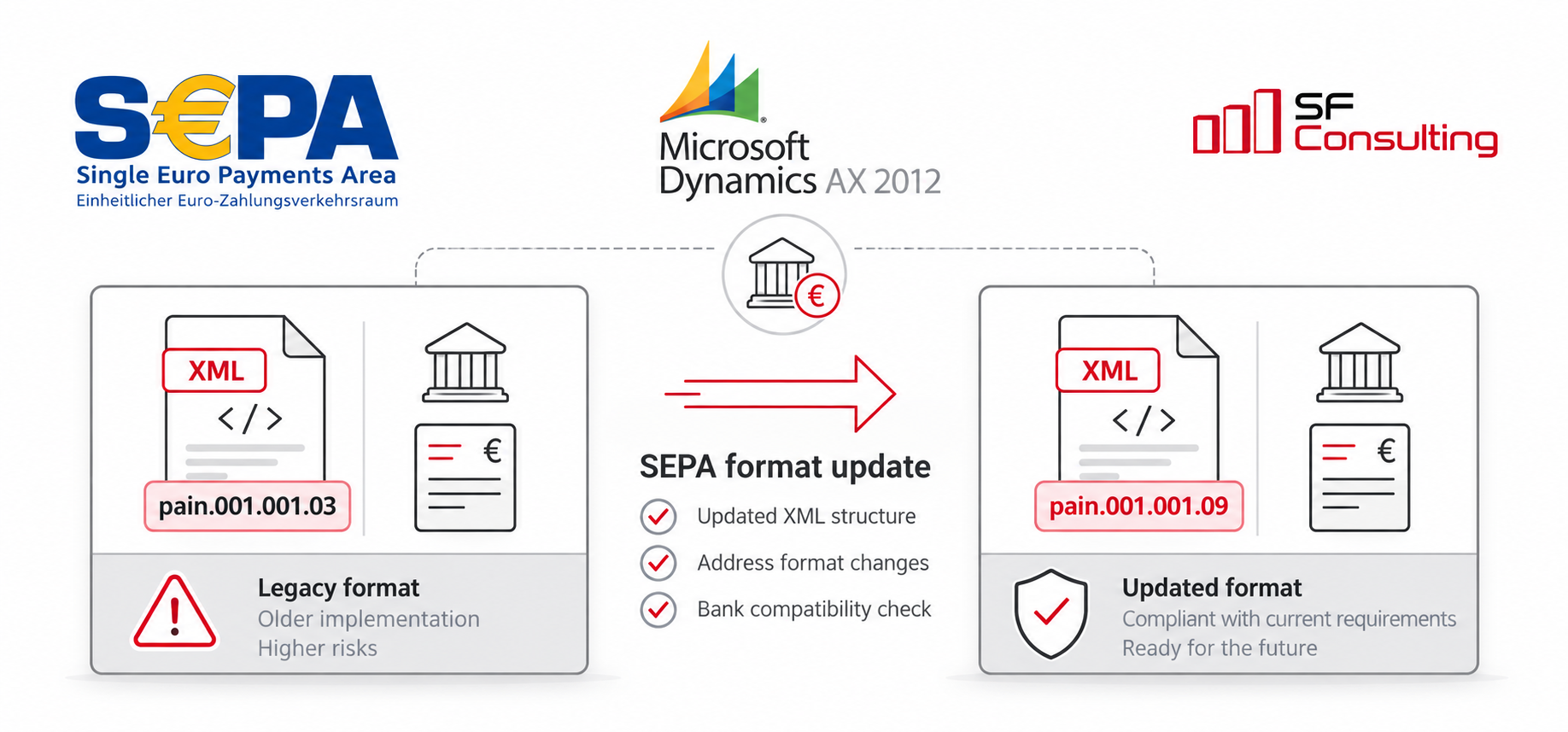
For Microsoft Dynamics AX 2012, this has a very practical impact. The standard SEPA Credit Transfer implementation in AX 2012 was designed for the older pain.001.001.03 format, where an address could be passed as one or more AdrLine elements without separating the town, postal code, street and other address components.
At the same time, the current SEPA Credit Transfer Customer-to-PSP Implementation Guidelines use the ISO 20022 pain.001.001.09 message for sending payment instructions from the customer to the bank.
The postponed deadline does not cancel the transition to the new requirements. It only gives companies more time to prepare. For AX 2012, this means that SEPA adaptation will still need to be addressed in the near future. If your system still generates pain.001.001.03, now is a good time to check your bank's requirements and estimate the changes needed to support pain.001.001.09.
Depending on the current implementation, the changes may affect the XSLT transformation, the data that AX provides in the source XML, or both.
To understand where changes may be required, we will first look at how SEPA Credit Transfer is implemented in Microsoft Dynamics AX 2012 and how the system generates the payment XML file.
How AX 2012 Generates a SEPA File
In Microsoft Dynamics AX 2012, SEPA Credit Transfer is implemented through the Application Integration Framework (AIF) and an outbound integration port.
In simplified form, the process looks like this:
AX first generates an XML document containing the payment journal data in its internal structure. The XSLT transformation configured for the outbound port then converts this XML into the required ISO 20022 structure, which is used to create the final SEPA file.
In the standard AX 2012 SEPA Credit Transfer implementation for pain.001.001.03, the XSLT resource VendPayments_SEPACreditTransfer_03_xsl is used.
This architecture makes it possible, in many cases, to adapt the payment file format without making major changes to the payment generation process itself. If all data required for pain.001.001.09 is already available in the source AX XML, most of the changes can be implemented directly in the XSLT.
If the required data is missing from the source XML, changing the XSLT alone will not be enough. In this case, the data that AX passes to AIF must also be extended.
Next, we will look at the main differences between pain.001.001.03 and pain.001.001.09 and identify which changes can be handled only in XSLT and which may also require changes in AX 2012 itself.
What Changes When Moving from pain.001.001.03 to pain.001.001.09
Moving from pain.001.001.03, which is supported by the standard SEPA Credit Transfer implementation in AX 2012, to the current pain.001.001.09 format involves more than simply changing the version number in the XML.
1. The namespace and message structure change
In pain.001.001.03, the document uses the following namespace:
urn:iso:std:iso:20022:tech:xsd:pain.001.001.03In pain.001.001.09, it changes to:
urn:iso:std:iso:20022:tech:xsd:pain.001.001.09However, changing the namespace alone is not enough. The structure of several elements has changed between the two versions, so an existing XSLT designed for pain.001.001.03 must be adapted to the new XML schema.
2. The postal address structure changes
This is one of the most visible changes for the standard SEPA implementation in AX 2012.
In pain.001.001.03, the debtor or creditor address could be passed mainly as free text using <AdrLine>.
For example:
<Cdtr>
    <Nm>SF Consulting GmbH</Nm>
    <PstlAdr>
        <Ctry>AT</Ctry>
        <AdrLine>Wohllebengasse 14, 1040 Vienna</AdrLine>
    </PstlAdr>
</Cdtr>
The current EPC Implementation Guidelines support three address formats: Structured, Hybrid and Unstructured Address. The EPC plans to phase out the fully unstructured format, but the previously announced deadline of 15 November 2026 has been postponed. At the time of publication, a new deadline has not yet been defined.
For a Structured Address, the main rules are:
- <AdrLine> is not used;
- <TwnNm> and <Ctry> are mandatory;
- other structured address elements such as <StrtNm>, <BldgNb>, <PstCd> and <CtrySubDvsn> are used when the corresponding data is available.
For our example, the address could look like this:
<Cdtr>
    <Nm>SF Consulting GmbH</Nm>
    <PstlAdr>
        <StrtNm>Wohllebengasse</StrtNm>
        <BldgNb>14</BldgNb>
        <PstCd>1040</PstCd>
        <TwnNm>Vienna</TwnNm>
        <Ctry>AT</Ctry>
    </PstlAdr>
</Cdtr>
This is where changes may be required not only in the XSLT, but also in AX itself. If the source XML contains only a single combined address string, it is difficult to reliably split it in XSLT into street, building number, postal code and town.
In this case, it is better to pass the required address components from AX as separate elements and use XSLT only to build the final pain.001.001.09 structure.
A Hybrid Address allows up to two <AdrLine> elements with a maximum length of 70 characters each, while <TwnNm> and <Ctry> are still mandatory. Information already provided in structured address elements must not be repeated in <AdrLine>.
For example:
<Cdtr>
    <Nm>SF Consulting GmbH</Nm>
    <PstlAdr>
        <PstCd>1040</PstCd>
        <TwnNm>Vienna</TwnNm>
        <Ctry>AT</Ctry>
        <AdrLine>Wohllebengasse 14</AdrLine>
    </PstlAdr>
</Cdtr>
A Hybrid Address can be a practical option for AX 2012 if some address components are already available separately while the remaining information is still stored or passed as free text.
3. The XML element BIC changes to BICFI
In pain.001.001.03, the <BIC> element was used for bank identification:
<FinInstnId>
    <BIC>DEUTDEFFXXX</BIC>
</FinInstnId>
In pain.001.001.09, the corresponding element is called <BICFI>:
<FinInstnId>
    <BICFI>DEUTDEFFXXX</BICFI>
</FinInstnId>
The current EPC Guidelines use BICFI within the Financial Institution Identification structure. Therefore, an existing AX 2012 XSLT should be checked for the use of the old <BIC> element.
4. The Requested Execution Date structure changes
In pain.001.001.03, the requested execution date was provided directly inside <ReqdExctnDt>:
<ReqdExctnDt>2026-09-25</ReqdExctnDt>In pain.001.001.09, ReqdExctnDt is a choice structure and contains either a <Dt> or <DtTm> child element. The EPC defines this element as DateAndDateTime2Choice.
For example:
<ReqdExctnDt>
    <Dt>2026-09-25</Dt>
</ReqdExctnDt>
This is a relatively small change from an XSLT perspective, but it also shows why the old XML cannot simply be reused with the new namespace without adapting its structure.
5. The identification structure has been extended
pain.001.001.09 provides more options for identifying organisations and financial institutions. For example, the current EPC Guidelines include AnyBIC, LEI and Other for organisation identification, while BICFI and other identification options are available for financial institutions.
This does not mean that all these elements must be added to every SEPA file. The identifiers actually required depend on the available company data, EPC requirements and the specification of the individual bank.
When adapting AX 2012, it is therefore important to compare not only the pain.001.001.09 XSD, but also the implementation guide of the bank that will receive the payment file.
These are not the only differences between pain.001.001.03 and pain.001.001.09. For AX 2012, the key question is which changes can be handled entirely in XSLT and which require additional data or changes in AX itself. This determines the actual scope of the implementation.
How to Prepare AX 2012 for pain.001.001.09
1. Check which data AX provides in the source XML and whether it is sufficient for pain.001.001.09.
2. Prepare a new XSLT for generating pain.001.001.09.
3. Create a separate outbound port to test the new transformation.
4. Generate a test SEPA XML file and validate it against the XSD and the requirements of the specific bank.
5. After successful testing, switch the production configuration to the new XSLT.
If your AX 2012 system still generates SEPA Credit Transfer files in the pain.001.001.03 format, we can review the current AIF/XSLT implementation, adapt it for pain.001.001.09, and help with bank-specific requirements and validation.
What About Dynamics 365 Finance?
In Dynamics 365 Finance, support for pain.001.001.09 is available through the standard Electronic Reporting (ER) framework.
Starting with Dynamics 365 Finance 10.0.37, Microsoft supports the generic ISO 20022 Credit Transfer format based on pain.001.001.09. Payment files are generated using the ISO20022 Credit transfer 2019 ER configuration and the corresponding localized versions.
In D365 Finance, moving to the current format is therefore usually handled by updating and configuring the relevant ER configurations, without changing the payment generation logic in X++.
If you have issues with Electronic Reporting, bank-specific payment formats, or adapting standard ER configurations to the requirements of a particular bank, our team can help with analysis, configuration, and solution adjustments.

BLEIBEN SIE MIT NEUEN ARTIKELN AUF DEM LAUFENDEN ABONNIEREN SIE UNSEREN NEWSLETTER
Inhaltsverzeichnis






Vielen Dank für Ihre Anfrage!
Wir werden uns in Kürze mit Ihnen in Verbindung setzen.