


D365FO Electronic Reporting: When Removing the Filter Is Not Enough
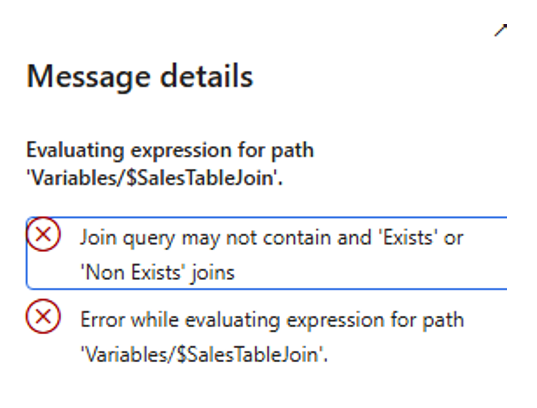
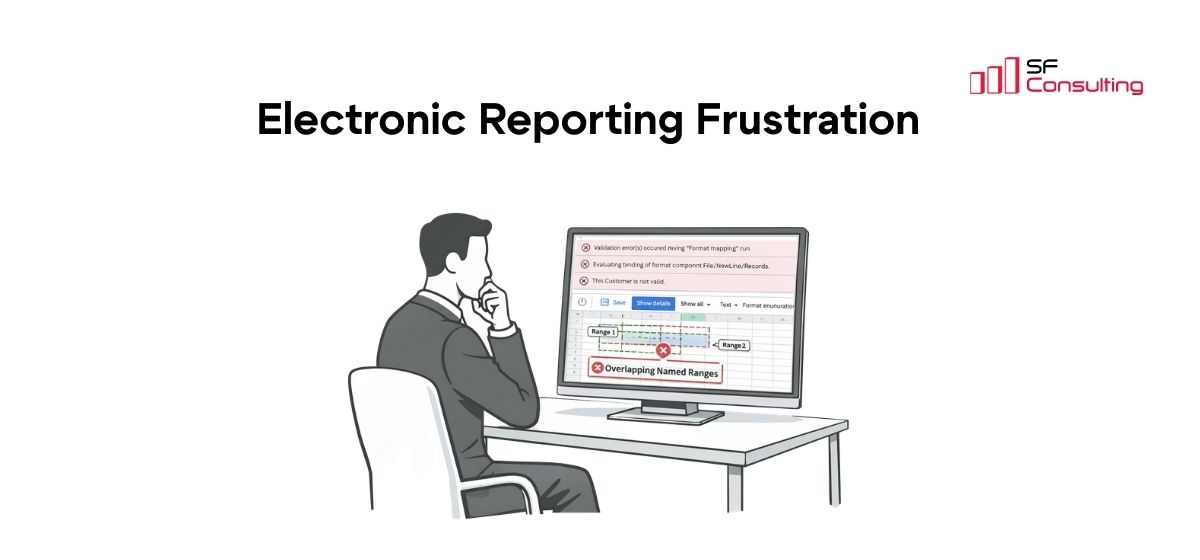
Join query may not contain and 'Exists' or 'Non Exists' joins
What makes this issue particularly confusing is that the ER model mapping can validate successfully, while the error appears only when the report is executed. Even more surprisingly, simply removing the filter that caused the problem might not be enough to make the report work again.
This article examines a real example, explains why the error occurs, shows how to recover from it, and discusses several ways to avoid the same problem in future ER designs.
The Scenario
In our example, the model mapping contains a CustInvoiceJour table data source and an ER data source of the Join type that combines several tables.
Microsoft describes the Join data source as a way to create a single joined record list from multiple nested data sources. When all participating data sources are of the Table records type, ER can execute the Join at the database level using a single SQL statement. Currently, ER Join data sources support Inner and Outer joins.
The problem can be reproduced as follows:
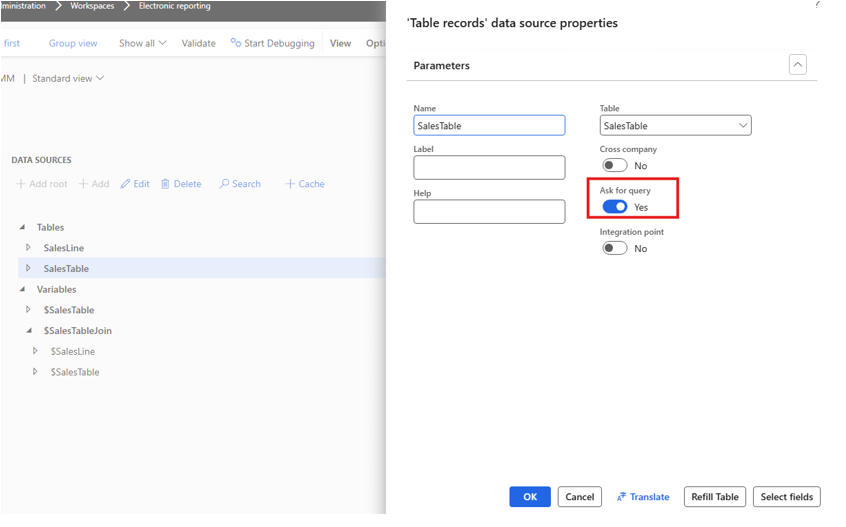
- Add the CustInvoiceJour table to the model mapping and enable the Ask for query option:
- Create a Join data source that combines this table with the other table data sources required by the mapping, for example, SalesLine:
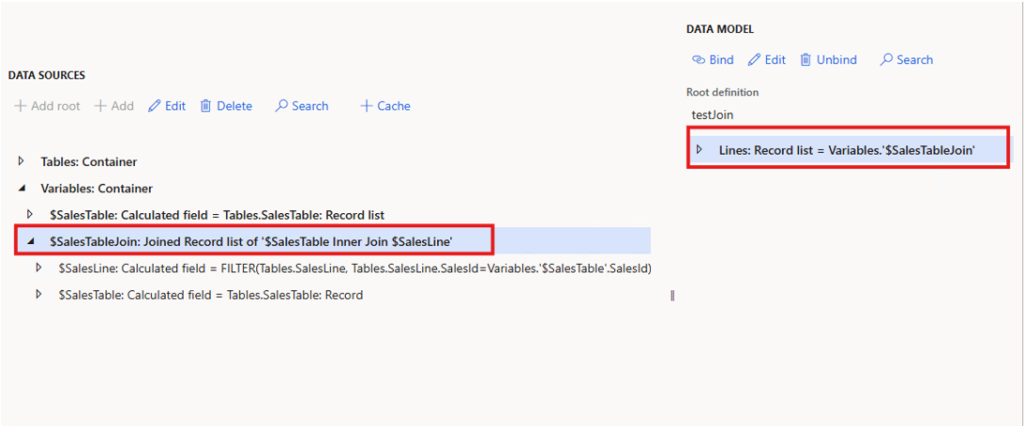
- Validate the model mapping. At this point, no validation error occurs.
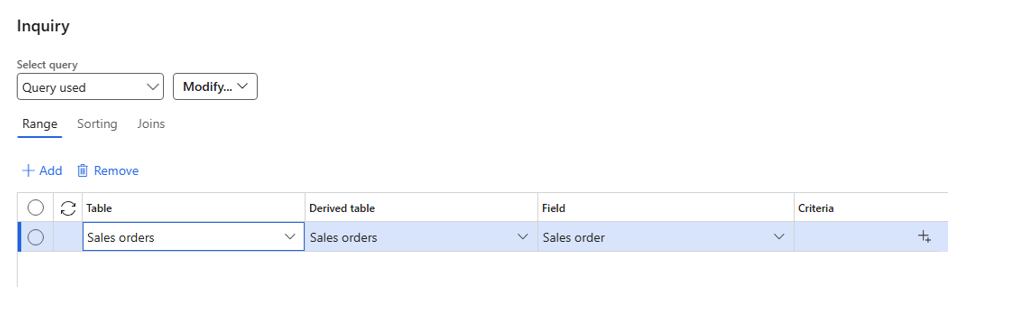
- Run the report and open the runtime query. Add a range using a field from a related table (in this example, Customer groups > Prices include sales tax):
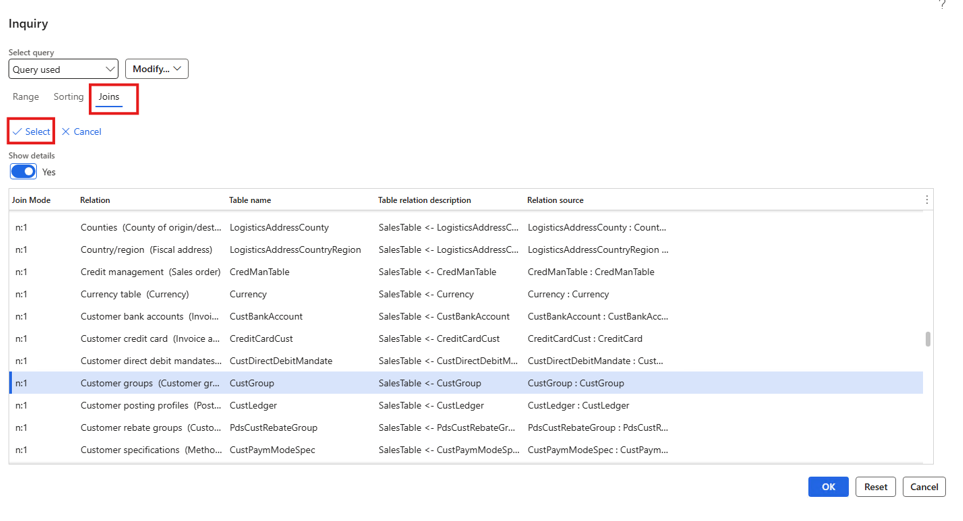
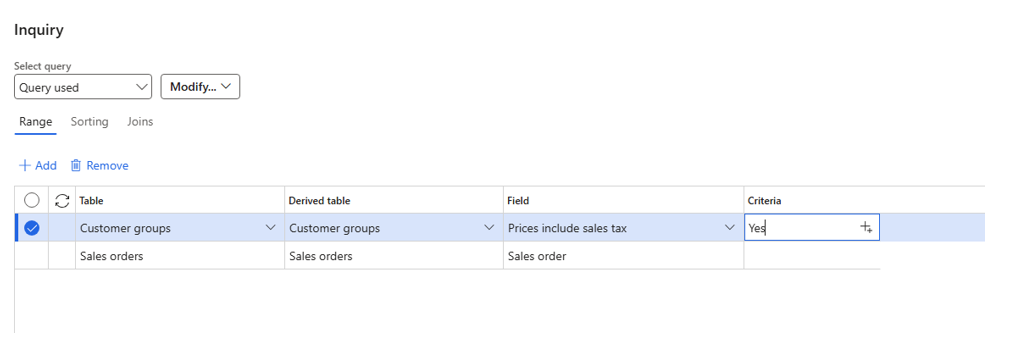
Because Ask for query is enabled, ER allows the runtime system query to be modified before the report is generated. Microsoft documents this option specifically as a way to let users specify filtering criteria at runtime.
- Run the report.
ER now fails while evaluating the joined data source:
Join query may not contain and 'Exists' or 'Non Exists' joins
Why the Error Appears
The important distinction here is between the ER configuration and the runtime query.
The ER Join data source itself has been configured using supported Inner and Outer joins, so the model mapping can validate successfully.
However, when Ask for query is enabled, the user can modify the query at runtime. Adding filtering through a related data source can change the structure of the runtime query. In our scenario, adding the related Sales orders data source resulted in an Exists join being introduced into the runtime query.
This distinction is the crux of the whole issue:
- A regular join (inner or outer) returns columns from both the parent and the joined table. You can map fields from either table to your ER model.
- An exists join (or notexists join) is fundamentally different. In X++, it compiles down to a SQL EXISTS (SELECT 1 FROM ...) clause. It only affects the WHERE clause of the query and it returns zero columns from the joined table. Its sole job is to test whether a matching row exists, not to retrieve data from it.
Here is where the conflict occurs: an ER Join data source supports Inner and Outer joins. If the runtime query supplied to one of its table data sources contains an Exists or NotExists join, that query structure is no longer compatible with the Join data source. As a result, ER can’t evaluate the joined data source and report execution fails.
Why Removing the Range Might Not Fix the Report
The next part of the issue is less obvious.
After the related-table range is removed, the Customer groups data source can remain in the runtime query. If you open the Joins tab, the related data source is still present:
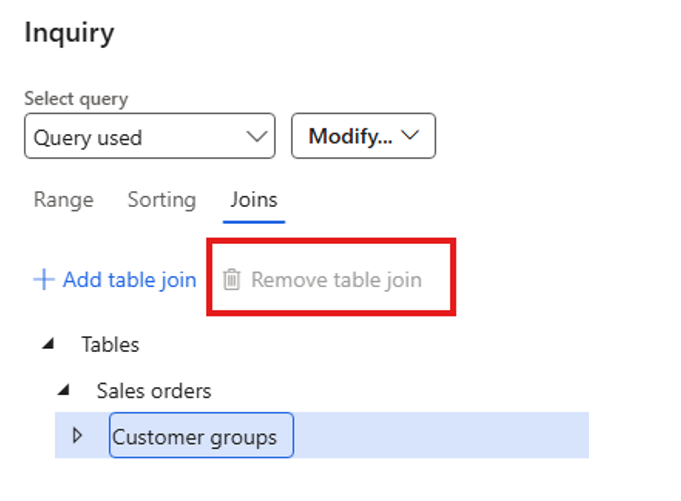
We can also see that the Remove table join button is disabled. It's disabled for both the Sales orders and Customer groups data sources, and the Reset button doesn't help either.
As a result, the next execution will fail with the same error even though the original filter value is no longer visible.
The effective recovery is to clear the relevant saved usage data and run the report again.
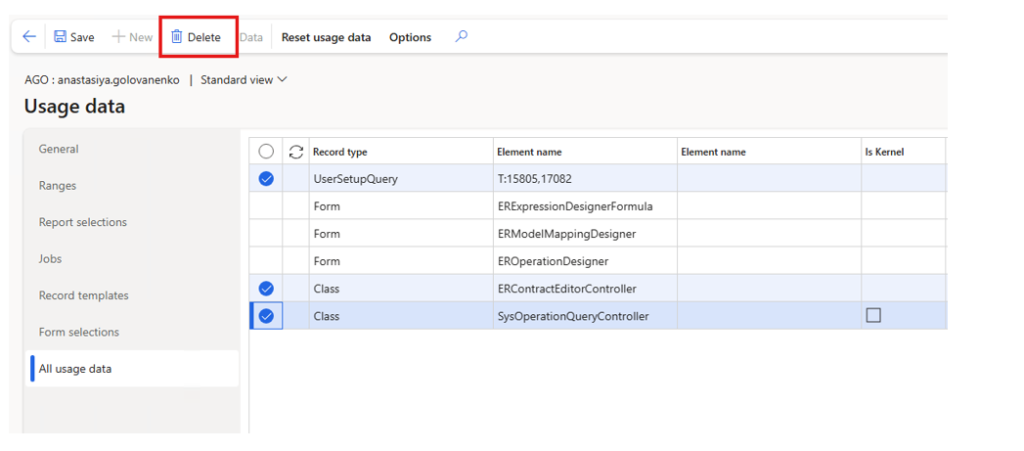
Finance and Operations stores user-specific usage data in the SysLastValue table. In this scenario, the saved runtime query state persists as part of that usage data between report executions.
So, to restore the report to working order, you need to clear the relevant usage data entry. And this recovery step is far from obvious to an end user.
How to Avoid the Problem
Once the immediate query state has been cleared, the next question is how the ER configuration should be designed so that users do not run into the same problem again.
Option 1: Use a Standalone Data Source
Instead of including the related table in the ER Join data source or adding it dynamically to the main table through the runtime query, configure it as a separate Table records data source in the model mapping.
You can then retrieve the required related records from a calculated field by using FILTER() together with functions such as FIRSTORNULL():
FIRSTORNULL(FILTER(RelatedTable, RelatedTable.KeyField = @.KeyField))
In this design, the related table is queried independently instead of being added to the runtime query of a table that participates in the ER Join.
This approach is particularly useful when you need to look up one or more related records or retrieve fields from them, but those records don't need to be part of the same joined result set.
The trade-off is performance: compared with a Join data source that can retrieve several tables in a single SQL statement, independent lookups can result in additional database calls and should therefore be tested carefully for large datasets.
Use this when: the related data can be retrieved independently and doesn't need to participate in the same ER Join result set.
Option 2: Move the Filtering Condition into the ER Mapping
If the filtering condition is known when the ER configuration is designed, implement it directly in the model mapping instead of allowing the user to add the related-table condition through the runtime query dialog.
Depending on the data source and the filtering requirement, the condition can be implemented using FILTER() or WHERE():
FILTER(DataSource, condition)
or
WHERE(DataSource, condition)
FILTER() changes the query of a Table records data source and applies the condition at the database level when the expression can be translated into SQL. WHERE() performs the record selection in memory and can therefore also be used when the condition can't be executed as part of the database query.
The important difference from the original scenario is that the filtering logic is defined explicitly in the ER configuration instead of being introduced dynamically through Ask for query at runtime.
Use this when: you need to filter the records returned by the ER mapping, but the filtering rule is known in advance and doesn't need to be configured by the end user at runtime.
Option 3: Move Complex Reusable Joins to an AOT View
Some selection logic is simply too complex to model cleanly through runtime filtering.
If the same combination of tables and conditions is required by several ER configurations, consider implementing it as an AOT view and exposing the view to ER as a single table-like data source.
This moves the complex relationship definition outside the ER configuration. From the ER perspective, the result becomes a much simpler data source that can then be filtered or mapped without reconstructing the same multi-table logic repeatedly.
The trade-off is that an AOT view requires development and deployment, so this approach makes the most sense for complex or reusable scenarios rather than one-off filters.
Use this when: the join is complex and you expect to reuse it across multiple ER formats or configurations.
The Root Cause in One Sentence
An ER Join data source supports Inner and Outer joins, so if runtime query customization introduces an Exists or NotExists join into one of its underlying table queries, the resulting query becomes incompatible with the Join data source and report execution fails.
Takeaway
Ask for query is a useful ER feature, but it also allows users to modify the query structure at runtime. When a Table records data source with Ask for query enabled is also used inside an ER Join data source, seemingly simple actions in the query dialog can change the structure of its runtime query and lead to errors that aren't detected during ER configuration validation because the problematic query structure is introduced only at runtime.
When troubleshooting this error, check two things separately:
-
First, determine whether the runtime query contains an additional related-table join.
-
Second, remember that removing the visible range might not remove the persisted query structure. If the report continues to fail, clear the relevant user query/usage data and start from a clean runtime query.
For the long-term solution, keep runtime queries simple, move predictable filtering logic into the ER mapping using FILTER() or WHERE() where appropriate, or use an AOT view when the relationship is too complex or reusable to be maintained comfortably in ER.


BLEIBEN SIE MIT NEUEN ARTIKELN AUF DEM LAUFENDEN ABONNIEREN SIE UNSEREN NEWSLETTER
Inhaltsverzeichnis







Vielen Dank für Ihre Anfrage!
Wir werden uns in Kürze mit Ihnen in Verbindung setzen.