


Electronic Reporting tips and tricks (part 3)
When designing data imports with Electronic Reporting (ER) in Dynamics 365 Finance & Operations, a handful of configuration details can make the difference between a robust import and one that silently drops data or fails unpredictably. This article covers three areas worth getting right from the start: parsing order, multiplicity, and type conversion.
1. Parsing Order of Nested Elements
The Parsing order property on nested elements controls how ER reads child elements inside an XML node. It has two modes, and the difference between them is greater than it looks.
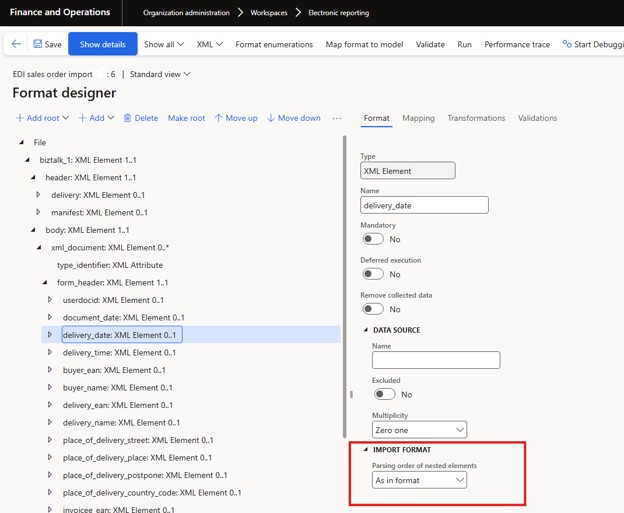
When set to As in format, ER expects incoming XML elements to appear in exactly the order defined in the ER format. During one of our implementations, an integration partner added an unexpected XML tag <deliveryDate> inside a node. ER did not raise an error — but because the tag wasn't defined in the format, all subsequent elements within that node were silently skipped.
Here, the tag <delivery_date> was expected but was renamed to <deliveryDate>. As a result, ER could not find the expected element, and the <free_text> and <delivery_code> tags were not imported either:
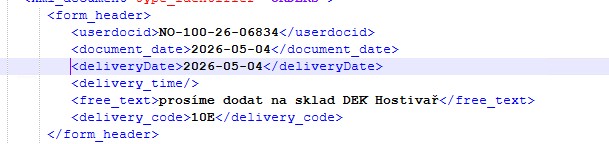
This is one of the trickiest failure modes: no error to investigate, no obvious symptom, just missing data that may remain unnoticed until something downstream breaks.
Setting Parsing Order to Any resolves the issue. ER will locate matching elements regardless of order, making your format tolerant of structural variations between partners or file versions.
If you change the property from As in format to Any for the parent node, all the information will be imported successfully. The trade-off is performance: ER has to scan additional nodes to locate matching elements, which adds up on large files.
Rule of thumb: use Any when you don't fully control the XML structure coming in. Use As in format only when you do, and the performance gain is worth the brittleness.
2. Multiplicity: Configure for Reality, Not the Happy Path
The Multiplicity property defines how many times an element is allowed to appear. Getting this wrong is one of the most common sources of silent failures in ER imports.
Zero many (0..*) is used for repeating elements that might also be absent — a list of comments is a good example:
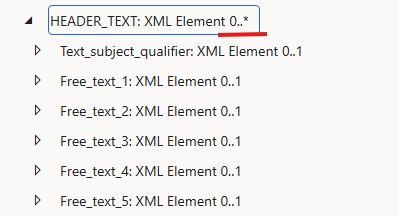
Zero one (0..1) is used for optional single elements. In the image above, Free_text_1 is set to Zero one.
Both options are flexible: they won’t cause your import to fail if the element is missing.
It is also possible to define multiplicity on the Value if the tag can be matched but is empty, and you want to check this before mapping.
Rule of thumb with Zero one: always check the IsMatched property before reading the element's value. If the tag isn't present in the file and you try to read it directly, the import fails at runtime:

The same applies to optional parent nodes — if the parent isn't matched, any attempt to access its children will fail too.
Exactly one and One many flip the logic. They tell ER to expect the element to always be there. If it isn't, ER marks the node as not matched, which may result in the node and its children being skipped during processing.
This sounds strict, which makes it tempting to use for structural validation. But in practice, in EDI integrations for instance, trading partners are inconsistent. A tag that's "always present" in the spec may be absent in one partner's files. When that happens, Exactly one doesn't give you an error message — it just drops the data.
Rule of thumb: default to Zero one and Zero many. Reserve Exactly one and One many for elements whose presence is contractually guaranteed and you're prepared to enforce.
3. Type Conversion: One Guard That Prevents a Category of Errors
A common pattern in ER imports is to define XML values as String in the format and convert them in model mapping using functions like VALUE(), DATEVALUE(), or DATETIMEVALUE(). This is convenient and generally works well — until a source element contains an empty string. Then the conversion fails with the error:
An error occurred during the 'Model mapping' run. For more information, contact your system administrator. Message details
Evaluating expression for path 'DeliveryDate'.
The fix is simple: before converting, verify that the element is matched and that it actually contains a value. Two conditions, not one:

This guard is small effort and prevents a whole category of runtime errors, especially when files come from multiple partners with inconsistent data quality. It's worth building the habit regardless of how clean your current data is.
One alternative is to define the type of value directly on the format element rather than converting in mapping and set Multiplicity to ZeroOne.
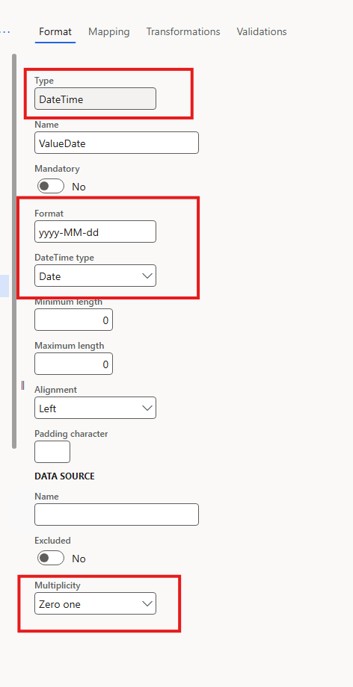
Then check the IsMatched property for both the tag and the value.
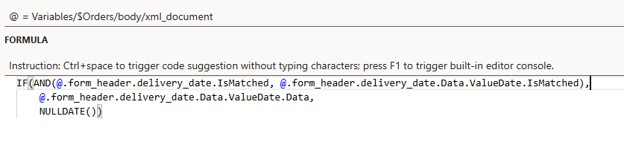
If you neither define multiplicity for the Value nor check the IsMatched property, an empty tag may cause all subsequent data within the node to be skipped silently.
Therefore, in both approaches, it is necessary to double-check whether the tag is empty. Which approach to choose is up to you.
Conclusion
These examples illustrate a broader point. Electronic Reporting is a powerful framework for building XML imports without deep X++ development — but a few configuration decisions have an outsized impact on reliability. Parsing order, multiplicity, and type validation are not just technical settings — they directly determine whether your import behaves predictably or silently loses data. Treat these properties as core design decisions in every ER data import to ensure consistency, transparency, and long-term stability.


BLEIBEN SIE MIT NEUEN ARTIKELN AUF DEM LAUFENDEN ABONNIEREN SIE UNSEREN NEWSLETTER
Inhaltsverzeichnis



Vielen Dank für Ihre Anfrage!
Wir werden uns in Kürze mit Ihnen in Verbindung setzen.