Standard Electronic Reporting (ER) formats in D365F&O are widely used as a foundation for statutory and operational reporting. In many implementation projects, these standard configurations are extended through derived versions to meet local requirements, adjust layouts, or introduce additional data elements.
While the derivation mechanism is designed to simplify customization and preserve upgradeability, structural changes may unexpectedly trigger validation errors at the format mapping level. In some cases, such errors occur even when no obvious functional changes were introduced, making troubleshooting particularly challenging.
In this article, we will examine an example of such a validation error using the standard SAF-T report as a practical case. Based on this scenario, we will analyze the technical root cause of the issue and demonstrate how to correctly align a derived configuration with the original structure to restore validation and maintain compliance with ER design principles.
The Standard Audit File for Tax (SAF-T) is a legally required electronic report in many countries. It is used to provide tax authorities with standardized accounting data in a structured format. D365F&O uses Electronic Reporting (ER) to generate SAF-T reports in compliance with local regulations. The name of the configuration which is used in such scenarios is General ledger statement by main account (Excel).
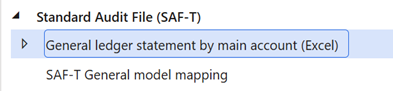
The validation error appears immediately after we create a derived format mapping from the standard configuration. No additional columns are added, no layout adjustments are introduced, and no structural changes are intentionally applied. The original Microsoft configuration remains valid and fully operational.
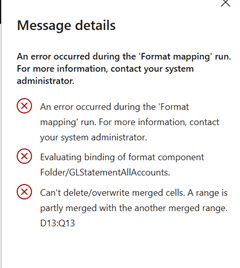
Message details
An error occurred during the 'Format mapping' run. For more information, contact your system administrator.
An error occurred during the 'Format mapping' run. For more information, contact your system administrator.
Evaluating binding of format component Folder/GLStatementAllAccounts.
Can't delete/overwrite merged cells. A range is partly merged with the another merged range. D13:Q13
In general, validation errors in ER format mapping are most commonly caused by misalignment between format bindings and the underlying data model. Such issues typically occur when the Excel template contains incorrect cell ranges, renamed or deleted named ranges, or improperly extended table areas. Because ER relies on predefined Excel named ranges and structured bindings, any mismatch between the ER configuration and the Excel file structure may result in binding failures.
However, in the specific case of the SAF-T report, the error occurs even though all Excel named ranges were defined correctly. In this scenario, the root cause is more complex.
It is necessary to compare the original Microsoft standard format mapping with the format mapping generated after creating the derived configuration and applying the required layout modifications: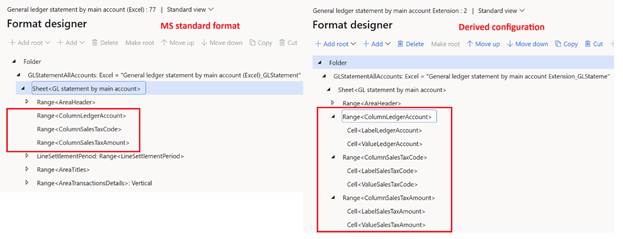
From a technical perspective, the standard report configuration uses column-level range definitions to control the conditional visibility of specific columns based on predefined expressions. This design relies on a precise hierarchy of named ranges that must not overlap.
The issue arises during the derivation process, when the Excel template is re-imported into the Electronic Reporting (ER) configuration. During this step, the system automatically generates additional cells within vertical ranges. As a result, some cells become positioned at the intersection of two separate named ranges.
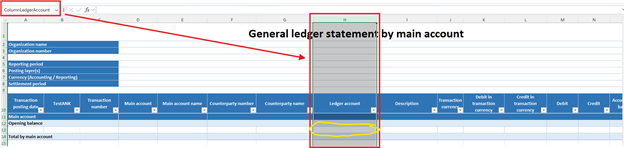
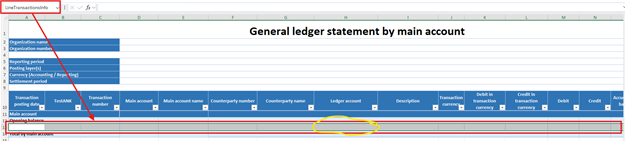
This situation is not supported by the ER framework, as overlapping range intersections are not allowed by design. The uniqueness of this standard report lies in its column-level conditional range structure, which makes it particularly sensitive to such automatically generated structural changes, ultimately leading to the validation error.
In such scenarios, our recommended solution is to manually adjust the format mapping by removing the automatically generated nested cells. This ensures that no cell is positioned at the intersection of two or more named ranges. The final structure of the format mapping should align with the original Microsoft standard implementation to maintain compatibility and prevent validation errors.
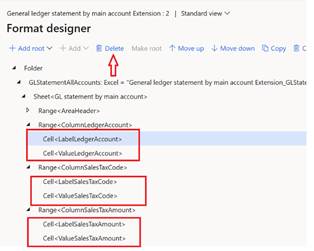
This case demonstrates that validation errors in ER formats are not always the result of direct user modifications. Even a technically “unchanged” derived configuration may contain structural differences that affect validation behavior.
When customizing standard ER reports, especially those based on complex Excel range logic, it is essential to review the generated format mapping structure rather than focusing solely on visible layout changes. A careful comparison with the original Microsoft implementation can significantly reduce troubleshooting time and help preserve both upgradeability and functional stability of the solution.
Aleksey Nakhabenko
Author
IT leader with over 10 years of experience, specializing in Microsoft Dynamics 365 Finance & Operations (D365FO). Leads delivery of solutions across core ERP modules, including Sales, Purchasing, Supply Chain Management, Electronic Reporting, and system integrations.