

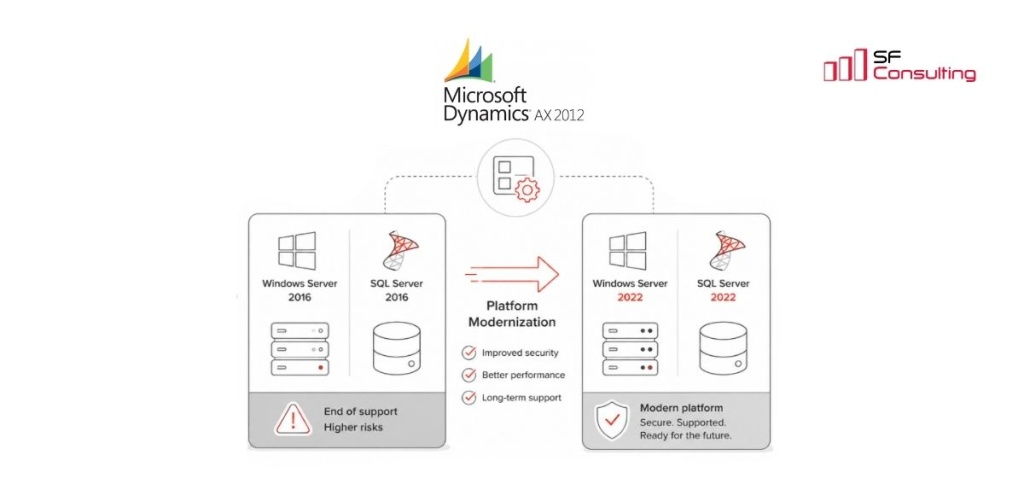
Modernizing the Microsoft Dynamics AX 2012 Platform
Microsoft Dynamics 365 Finance & Operations is one of the most widely adopted ERP solutions across Europe. However, our experience shows that many organizations continue to rely on Microsoft Dynamics AX 2012 instead of migrating to a newer ERP platform.
This is hardly surprising. Over the years, AX 2012 has become deeply embedded in business operations. Organizations have established stable business processes, users are familiar with the system, roles and responsibilities are clearly defined, and internal support teams have built up years of practical expertise. For many companies, AX 2012 remains a reliable, predictable, and business-critical ERP system.
Unfortunately, Microsoft Extended Support for Microsoft Dynamics AX 2012 ended on 10 January 2023. At the same time, the technology platform supporting AX 2012 is approaching the end of its supported lifecycle. According to Microsoft's official system requirements, the latest supported platform for AX 2012 includes Windows Server 2016 (supported until 12 January 2027) and SQL Server 2016 (supported until 14 July 2026).
The end of support for an ERP application does not mean organizations have to continue operating it on an outdated technology platform. In practice, the greatest risks often come not from the application itself, but from the surrounding platform components.
Even if Microsoft Dynamics AX 2012 continues to meet business requirements, the operating system, SQL Server, SQL Server Reporting Services (SSRS), backup and disaster recovery solutions, monitoring tools, security software, and integration services all have their own product lifecycles. As support for these components expires, organizations face increasing challenges in maintaining security, applying updates, ensuring compatibility with modern technologies, meeting compliance requirements, and guaranteeing reliable disaster recovery.
For many organizations, replacing the ERP system is not the only available option. Instead, they choose to modernize the underlying platform by upgrading to supported versions such as Windows Server 2022 and SQL Server 2022. These versions provide an excellent balance between long-term Microsoft support and practical compatibility with Microsoft Dynamics AX 2012. Windows Server 2022 remains under Microsoft support until 14 October 2031, while SQL Server 2022 is supported until 11 January 2033.
Two Approaches to Modernizing the AX 2012 Platform
When discussing platform modernization for Microsoft Dynamics AX 2012, we primarily refer to upgrading the underlying Windows Server and SQL Server platforms. Based on our project experience, organizations typically choose one of two approaches:
- Perform an in-place upgrade of the existing servers.
- Deploy new servers and install Microsoft Dynamics AX 2012 together with all required components from scratch.
Both approaches are valid, and the right choice depends on the existing environment, business requirements, and acceptable downtime.
An in-place upgrade is typically the preferred option when the environment is relatively straightforward, well documented, and based on Microsoft-supported upgrade paths. If the number of integrations is limited, the servers are in good health, and the business can tolerate a maintenance window (during nights or weekends) - this approach minimizes configuration effort while preserving the existing environment.
Deploy new servers is generally the better choice when minimizing downtime is a key business requirement or when the existing environment has evolved over many years without sufficient documentation. Complex AX 2012 implementations often include numerous integrations, custom components, scheduled jobs, and third-party dependencies that are difficult to identify and validate. In these situations, running the new servers in parallel with the existing production environment allows the business to perform comprehensive testing and compare results before the final cutover, significantly reducing implementation risk.
In-Place Upgrades
An in-place upgrade means upgrading the software directly on the existing production servers. Server names, IP addresses, installed services, local file paths, scheduled tasks, firewall rules, and many other configuration settings remain unchanged.
This approach is attractive because it typically requires significantly less configuration work than deploying new servers. If the environment contains relatively few third-party components and dependencies, and the current versions of Windows Server and SQL Server support a direct upgrade path, an in-place upgrade can usually be completed much faster than rebuilding the entire platform.
However, it is important to remember that not every SQL Server version can be upgraded directly to SQL Server 2022. Depending on the current version, the upgrade may need to be performed in multiple stages. For example, it may first be necessary to install the latest supported Service Pack or upgrade to an intermediate SQL Server version before proceeding to SQL Server 2022. Planning and validating the supported upgrade path in advance is therefore essential.
Advantages of an In-Place Upgrade
- Minimal reconfiguration effort. Existing server names, local file paths, AX 2012 configuration, installed applications, integration folders, certificates, scheduled tasks, and service accounts can usually remain unchanged. This significantly reduces the time required to prepare the upgraded environment.
- Lower risk in poorly documented environments. If nobody knows exactly which local DLLs, COM objects, ODBC data sources, certificates, printers, scheduled tasks, or other components are actually being used, upgrading the existing servers minimizes the risk of accidentally breaking business-critical functionality.
Disadvantages of an In-Place Upgrade
- System downtime during the upgrade. Although the process can be rehearsed on development or test environments, production systems are almost always more complex and may require considerably longer maintenance windows. If prolonged downtime has a significant business impact, an in-place upgrade may not be the right approach.
- Upgrade failures can leave servers in an inconsistent state. Even with thorough preparation, an in-place upgrade may fail unexpectedly, leaving the server unusable until the root cause is identified and resolved. While full virtual machine backups make rollback possible, the entire upgrade process may have to be repeated.
- Technical debt is preserved. Legacy drivers, obsolete registry settings, unused local components, outdated integrations, and historical workarounds remain on the servers after the upgrade. As a result, the platform may be running on modern software versions while still carrying years of accumulated technical debt.
- Post-upgrade issues must be resolved directly in the production environment. If unexpected problems appear after the upgrade, troubleshooting and remediation typically have to be performed on live systems, increasing operational risk.
Deploying New Servers
The alternative approach is to deploy new servers, install the required software stack, and perform a fresh installation of Microsoft Dynamics AX 2012 together with all supporting components.
Although this approach requires more preparation and implementation effort, it provides a cleaner and more controlled migration process. The project team can build the target environment according to current standards, document every dependency, validate all configurations, and complete comprehensive testing before the production cutover. Meanwhile, the existing environment remains fully operational until the new platform is ready to go live.
Advantages of Deploying New Servers
- A clean installation eliminates many hidden issues accumulated over years of system operation. The project team has full visibility into which components are installed, which firewall rules are configured, which service accounts are used, and how security permissions are assigned.
- The existing environment remains available throughout the project. This allows business users and technical teams to compare system behavior, validate business processes, and verify integrations before switching production workloads to the new platform.
- An excellent opportunity to reduce technical debt. Deploying new servers provides a natural opportunity to review and document every prerequisite, driver, registry modification, folder permission, network port, certificate, scheduled task, and third-party dependency. Unnecessary components can be removed, documentation updated, and the overall platform significantly simplified.
Disadvantages of Deploying New Servers
- Significantly more configuration work is required. A typical AX 2012 environment consists of many interconnected components that must all be installed and configured correctly. These may include SSRS extensions, Business Connector, AOS instances, Batch Servers, integration folders, custom DLLs, COM components, third-party drivers, document management folders, service endpoints, DNS aliases, SPNs, Kerberos delegation, firewall rules, certificates, and many other infrastructure elements.
- Comprehensive testing is essential before go-live. Every critical business process, integration, report, batch job, and external service should be validated to ensure the new platform behaves exactly as expected.
- Some legacy components may no longer be readily available. Certain prerequisites required by AX 2012 have become increasingly difficult to obtain. Unfortunately, some historical Microsoft download links are no longer available. Before starting the modernization project, verify that all required installation packages, drivers, and supporting software have been archived. Otherwise, locating them later may significantly delay the project.
Common Risks Regardless of the Chosen Approach
Regardless of whether you choose an in-place upgrade or deploy new servers, several risks should be considered before starting the project.
The most common non-technical issue we encounter is insufficient business testing. While technical teams can verify that services start successfully, CIL is generated, database synchronization completes without errors, and SSRS reports are deployed, none of this guarantees that the business can operate normally.
Following a platform modernization, organizations should always perform end-to-end testing of all business-critical processes. This should include not only core ERP functionality but also integrations, batch jobs, reporting, printing, warehouse operations, and every business scenario that is essential for daily operations.
Another common challenge is the compatibility of custom .NET assemblies. Many AX 2012 environments rely on internally developed or third-party DLLs that have been running unchanged for many years. These components may depend on older versions of the .NET Framework, TLS protocols, certificate stores, COM components, Visual C++ Redistributables, or third-party SDKs that are no longer fully compatible with modern versions of Windows Server or SQL Server.
In many cases, the issue is not the DLL itself, but its dependency chain. A custom integration component may require a specific version of a vendor SDK, Oracle Client, SFTP library, payment provider SDK, PDF generation library, barcode component, tax connector, or another runtime dependency. All of these dependencies should be identified, documented, and validated before the migration begins.
System integrations are often the first components to fail after a platform upgrade. Modern versions of Windows Server introduce changes in TLS protocols, cipher suites, certificate validation, authentication mechanisms, and service account security. As a result, integrations that have been operating reliably for years may suddenly stop working because an external system no longer supports the required protocols or because the upgraded server enforces newer security standards that the external service cannot meet.
One additional compatibility issue we have identified during several AX 2012 modernization projects concerns Management Reporter. Based on our experience, Management Reporter doesn’t operate reliably with SQL Server 2022. Organizations that still depend on this component should therefore plan to upgrade their database platform only to SQL Server 2019.
Key Recommendations
- Inventory all integrations and third-party components before starting the project.
- Validate the Microsoft-supported upgrade path for Windows Server and SQL Server.
- Perform end-to-end business testing rather than relying solely on technical validation.
- Maintain a rollback strategy throughout the modernization.
- Consider deploying new servers if minimizing production risk is a priority.
Conclusion
Modernizing the platform supporting Microsoft Dynamics AX 2012 can be technically challenging. Most AX 2012 environments have evolved over many years and typically include legacy integrations, custom components, historical workarounds, and undocumented dependencies that require careful analysis before any upgrade begins.
However, these challenges should not discourage organizations from modernizing their platform. Continuing to operate business-critical systems on unsupported versions of Windows Server, SQL Server, and other infrastructure components usually presents far greater operational, security, and compliance risks than the modernization project itself.
With proper planning, thorough testing, and a structured implementation approach, organizations can continue running Microsoft Dynamics AX 2012 on a modern, fully supported technology platform for many years to come.
If you are planning to modernize your Microsoft Dynamics AX 2012 platform and would like to avoid the common pitfalls described in this article, our team will be happy to share our experience, provide practical guidance, and help you plan and execute a safe, predictable modernization project.


Keep up to date with new articles before anyone else, subscribe to our mailing list
Table of Contents

Thank you for the request!
We will get back to you soon.