


Dynamics 365 F&O: Workflow Customizations
However, certain enterprise use cases require extending workflow behavior in code. One common area involves dynamically determining workflow users based on business data, organizational structure, or custom rules. For this purpose, the platform supports extensible workflow participant providers, allowing developers to programmatically resolve workflow participants at runtime.
This article focuses on a single customization scenario: implementing a custom participant provider for an existing workflow.
Adding a new custom participant provider for an existing workflow
Business scenario
In this example, the Sales Quotation document has been extended with two custom fields: Technical Manager and Commercial Manager. The business requirement is to update the Sales Quotation approval workflow so that approval tasks are assigned to the appropriate manager (technical, commercial, or both) based on the values provided in these custom fields on the quotation header.
This is a common customization scenario in Dynamics 365 Finance & Operations. While the standard workflow engine supports several assignment strategies, they are insufficient for this use case because assignment must be dynamically determined from custom document data.
Standard assignment options
Out of the box, the workflow editor provides multiple ways to assign tasks or approvals to users:
- Assignment to a specific user
- Assignment via hierarchy
- Assignment to the workflow originator or owner
- Assignment to a specific user group or security role
- Assignment based on an existing participant provider
None of these methods satisfy the requirement, because assignment must evaluate custom fields on the Sales Quotation itself. To support this logic, we need to introduce a custom participant provider.
Participant provider implementation
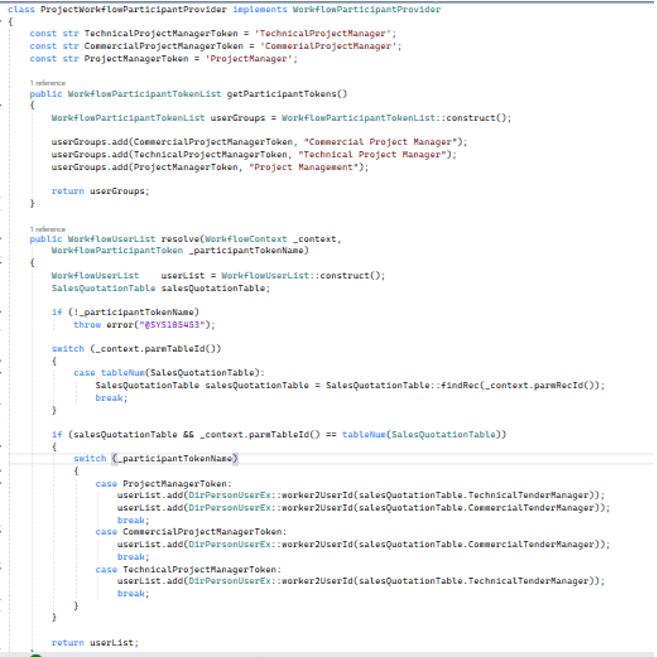
To add a custom participant provider, create a class implementing the WorkflowParticipantProvider interface. The interface defines two required methods which must be implemented in new provider:
- getParticipantTokens() - this method defines the participant tokens that will be available for selection in the workflow editor. Each token represents a logical participant (e.g., "TechnicalManager" or "CommercialManager") and will later resolve to one or more actual users during workflow execution. Tokens can be defined as constants within the provider class or retrieved dynamically from a configuration table.
- resolve() - responsible for resolving the selected participant token into a user list. The workflow engine subsequently assigns the task or approval step to those users. The first parameter provides workflow context (the document record instance), and the second parameter specifies the token name configured in the workflow editor.
Example implementation of a participant provider class:
Assignment Provider Configuration
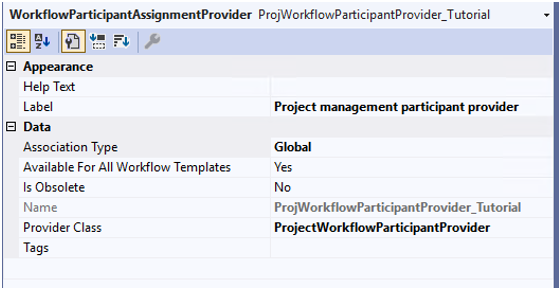
After implementing both methods, you must register the provider in a Workflow Assignment Provider. This links the custom provider class to the workflow engine and defines for which workflows and templates the provider will be available.
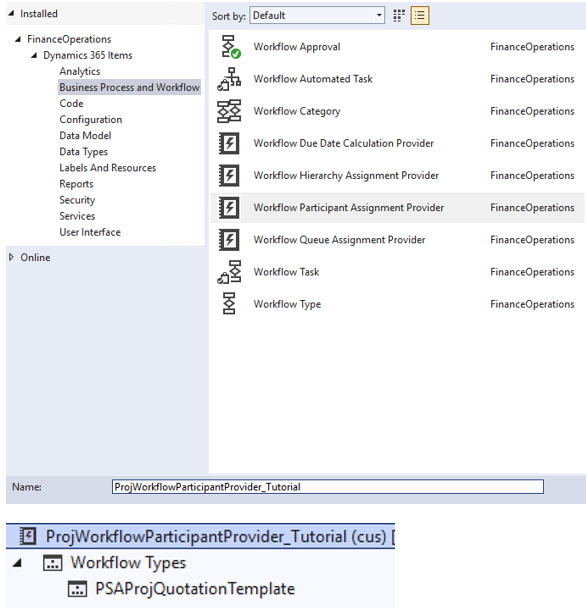
Within the provider configuration, specify:
- The provider class name
- The workflow types or templates that should use it
Workflow Editor Usage
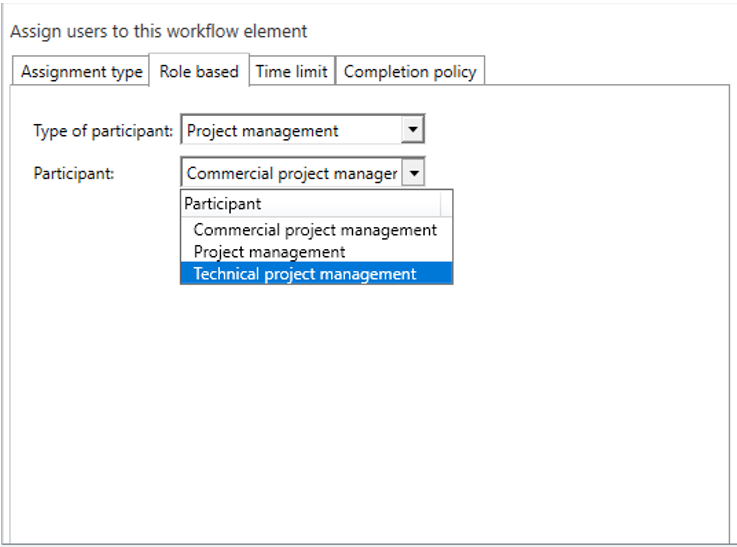
Once the solution is built and synchronized, the new participant provider and its tokens become available in the workflow editor.
When defining assignments for tasks or approval steps, you can now select:
- The custom participant provider
- The specific participant token (e.g., “TechnicalManager”)

Keep up to date with new articles before anyone else, subscribe to our mailing list
Table of Contents








Thank you for the request!
We will get back to you soon.